

To host a virtual workshop, pick one outcome, cap the group small enough that everyone can take part, build the agenda around activities instead of slides, and sell seats from a page that also handles payment and follow-up. The teaching is the part you already know. The part that trips up most coaches and creators is the plumbing: a registration link here, a payment tool there, a reminder email somewhere else. With Constants, your workshop tickets, bookings, memberships and community can all sit on one page at constants.com/yourname, so the plumbing stays small and the session gets your attention.
TL;DR
- A workshop is not a webinar. Aim for a group of 30 or fewer, 60 to 90 minutes, and real participation, not a lecture with a Q&A at the end.
- Change the activity every 10 to 15 minutes, plan breaks, and give breakout rooms a prompt, a timer and roles.
- Open registration 6 to 8 weeks ahead when you can, send a reminder the day before, and send a feedback form within 24 hours.
- Sell tickets with clear terms (live only, replay, or both) and work backward from your costs to a seat target.
- On Constants, a one-time sale such as a ticket carries a 6% platform fee on every plan, plus Stripe card processing, and the Starter plan is free.
Table of Contents
- What Is a Virtual Workshop, and How Is It Different From a Webinar?
- Virtual Workshop Ideas That Sell
- How to Run a Virtual Workshop, Step by Step
- How to Make an Interactive Online Workshop Engaging
- Virtual Workshop Platforms: What to Look For
- How to Price and Sell Workshop Tickets
- How to Promote a Virtual Workshop
- Set Up Your Workshop on Constants
- Frequently Asked Questions
- Sources
What Is a Virtual Workshop, and How Is It Different From a Webinar?
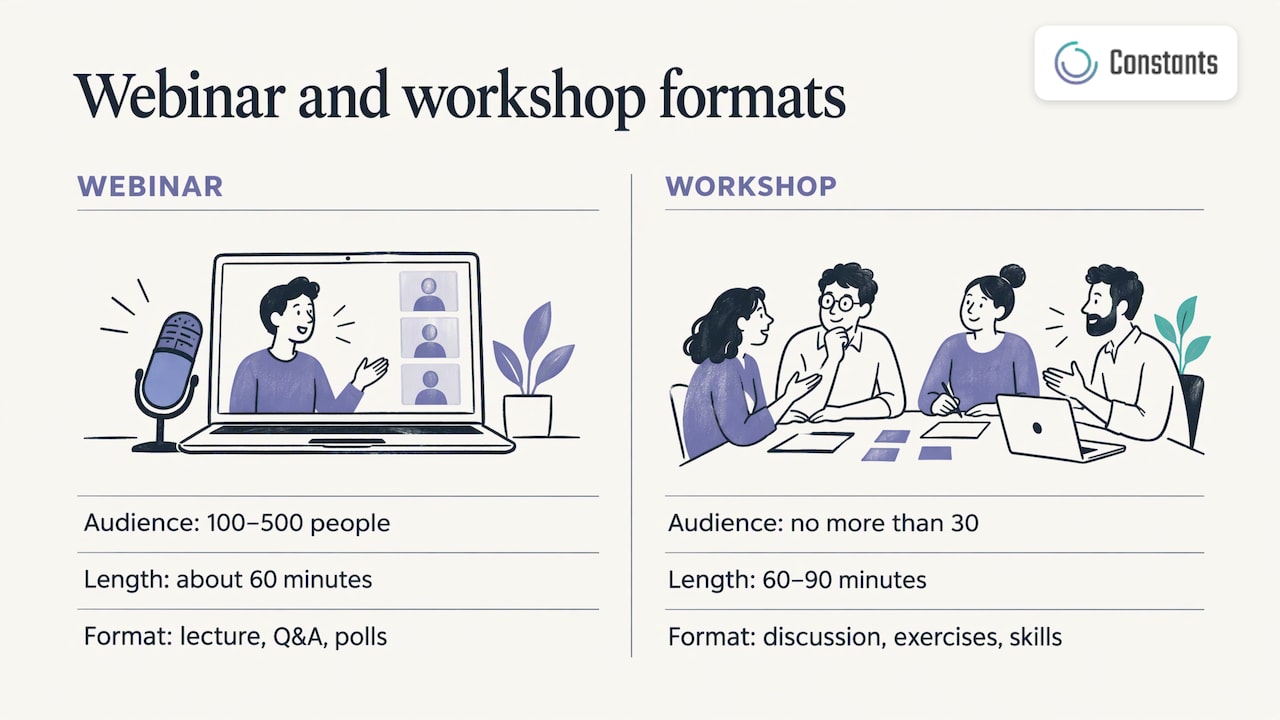
A webinar is mostly one person talking to many. A workshop is a small group doing something together. Cochrane's good-practice guidance for webinars and virtual workshops puts numbers on the difference: webinars are lecture-style sessions with Q&A and polls that can reach 100 to 500 people and usually run about 60 minutes, while virtual workshops are for groups of no more than 30, run 60 to 90 minutes, and focus on discussion, exercises and skill building.
The Thomson Foundation goes smaller for hard subjects. Its e-workshop format uses eight to ten fully interactive participants with cameras and audio on, and it has used the format to teach technically complex skills. It also reports that participants say they feel closer to the trainer than in a room, and that the trainer can make sure quieter people get a turn, not only the most confident voices.
Why this matters for you: the format decides your price, your marketing and your tools. A webinar is a good top-of-funnel move when you want reach. A workshop is a better paid product when you want results and repeat buyers. If you are still weighing the two, our guide to webinar vs workshop walks through how to pick.
Virtual Workshop Ideas That Sell
The best workshop ideas are narrow. "Marketing" is a course. "Write your first three launch emails" is a workshop. Miro's guide to interactive online workshops recommends narrowing the idea, checking that there is demand, and defining a learning outcome before you build anything. A good test: can you finish the sentence "By the end, you will have..." with something a person can hold or use?
Here are formats that fit the kinds of people who sell on Constants.
Skills sessions for coaches and consultants. A fitness coach might run a 90-minute "build your four-week training block" session where each participant leaves with a draft plan. A career coach could run a résumé teardown. A business consultant might host a pricing workshop where everyone brings their current rates. These are hypothetical examples, but the pattern holds: one deliverable, built live.
Live makeovers and working sessions. Participants submit a page, a portfolio or a plan in advance, and you rework a few live while the group watches and applies the lessons to their own. One marketer's format guide notes that live makeovers tend to drive far above-average registrations.
Peer exchanges and discussion formats. The American Association for the Advancement of Sustainability in Higher Education lists alternatives to the slide deck in its best-practices guide: debates, fishbowl, case-study discussion, solution labs, World Café and peer exchange. Peer consulting in groups of three or four, for 30 to 40 minutes, suits audiences who learn as much from each other as from you.
Creative and skills-based classes. SessionLab's list of workshop ideas runs from communication, storytelling and decision-making to art, music and creative writing. If you teach a craft, the workshop is the product.
Pre-recorded plus live. Eventbrite suggests pre-recorded formats for workshops where attendees may want to revisit the material, and livestreams for real-time exclusivity. A practical mix: sell the live session, then offer the replay as a separate ticket option or as a perk for members.
How to Run a Virtual Workshop, Step by Step
SessionLab's 18-step planning guide runs from defining goals to following up. You do not need all 18 for a first session. These seven cover what matters for a solo host or a small team.
1. Define one outcome and one audience
Write one sentence: who it is for and what they will have at the end. Gate One Consulting's remote-workshop playbook stresses that it is easy to say no to a web meeting, so ask what will make someone accept your invitation and how they will benefit. That sentence becomes your page headline.
2. Choose your group size
Cochrane caps workshops at 30. Gate One suggests 12, 16 or 24 people because those numbers divide neatly into breakout groups, and says complex topics do better with fewer participants. If you are selling at a premium, start at 8 to 12 and raise the cap once you have run it twice.
3. Build the agenda around activities
AASHE recommends limiting activity blocks to 10 to 15 minutes because adult attention drops after that, and a 5-minute break for every 45 to 60 minutes of content, with never more than 90 minutes without a break. It also advises trimming at least a third of what you would cover in person. NFPA's 50 tips for virtual workshops adds that a three-hour session should have at least 20 minutes of breaks, that you should not lean on slides, and that you should leave extra time for introductions and transitions.
A 90-minute skeleton might look like this: 10 minutes of check-in and a warm-up poll, 15 minutes of teaching, 20 minutes of solo or pair work, 5 minutes of break, 25 minutes of breakout discussion, 10 minutes of debrief, and 5 minutes of next steps. That is a hypothetical layout, so adjust it to your topic.
4. Plan your breakout rooms before you go live
Breakouts fail when people land in a room with no instructions. AASHE recommends giving each group a prompt, a timer, assigned roles, at least three people when pairs are not required, and a shared document to capture the work. Decide who goes where beforehand, as Gate One advises, and have a helper or co-facilitator ready to visit rooms. One practical catch from the Thomson Foundation: in Zoom, breakout rooms need a regular meeting rather than the webinar format.
5. Define roles
Cochrane lists four: organizer, moderator, presenter and facilitator. Solo hosts wear all four hats. If you can, bring in one person to watch the chat and handle technical problems so you can teach.
6. Rehearse the whole journey
Test your equipment, your timing and your content. Gate One recommends piloting new material with a small group. Loopyah's virtual event marketing guide goes further and suggests testing the complete buyer route, from payment to the joining email, on a second device, and rehearsing failures such as a speaker losing connection or the joining email landing in spam. When you plan for tech trouble and for access, our friends' guide to website accessibility basics is a good checklist for your registration page.
7. Follow up inside 24 hours
Cochrane recommends sending an evaluation form within 24 hours. Pair it with the replay link, the shared document and one clear next step, such as the next workshop or a membership.
How to Make an Interactive Online Workshop Engaging
An interactive workshop gets people talking or doing something every few minutes. SessionLab's James Smart puts it simply: the best thing you can do is get people talking and collaborating. Here are the moves that do that without needing fancy software.
Start with a check-in that takes 60 seconds: one word in the chat about how they are arriving, or a poll about their experience level. AASHE recommends polls, chat storms (everyone types at once, then you read highlights) and think/pair/share, where people think alone, discuss with one partner, then share with the group.
Keep your own talking blocks short. Cochrane suggests presentations of no more than 15 to 20 minutes at a stretch. After each block, hand over a task: draft something, fix something, rank something.
Be honest when the technology misbehaves. Smart notes that owning a technical glitch openly can make the room feel like everyone is in it together, which beats pretending nothing happened.
Finally, leave room for the hallway. NFPA points out that participants lose the informal chat that happens between sessions in a physical room, so build in a few minutes of open time at the start or during breaks.
Virtual Workshop Platforms: What to Look For
You need two things that people often blur together: a place to deliver the session, and a place to sell it. Delivery tools handle video, breakout rooms, chat and screen sharing. Airmeet's feature overview lists what to compare: breakout rooms, polls, Q&A and raise-hand tools, screen sharing and whiteboards, good audio and video, recording and replay, live support, analytics, and captions. For a group of 30 or fewer you rarely need the large-scale features. Breakout rooms, recording and captions matter most.
The selling side is where small creators lose hours. You need a page that explains the outcome, takes payment, confirms the seat and gives the attendee what they need to join. Constants is built for that part. Your page at constants.com/yourname combines a link-in-bio landing page with a shop for digital products, calendar-based 1:1 bookings, event tickets and recurring memberships, plus a community, analytics and a notes workspace. For deeper comparisons, see our guides to virtual event platforms and webinar platforms, and for the setup steps, the support article on creating and running a webinar.
How to Price and Sell Workshop Tickets
Start with the ticket types. Loopyah advises defining each one before you promote: live session, replay, or live plus replay, with clear terms for each. Eventbrite's online workshop page suggests tiers such as early bird or VIP access and a capacity limit. A capacity limit also supports your small-group promise: when the room is capped at 20, saying "20 seats" is accurate and creates a real reason to register early.
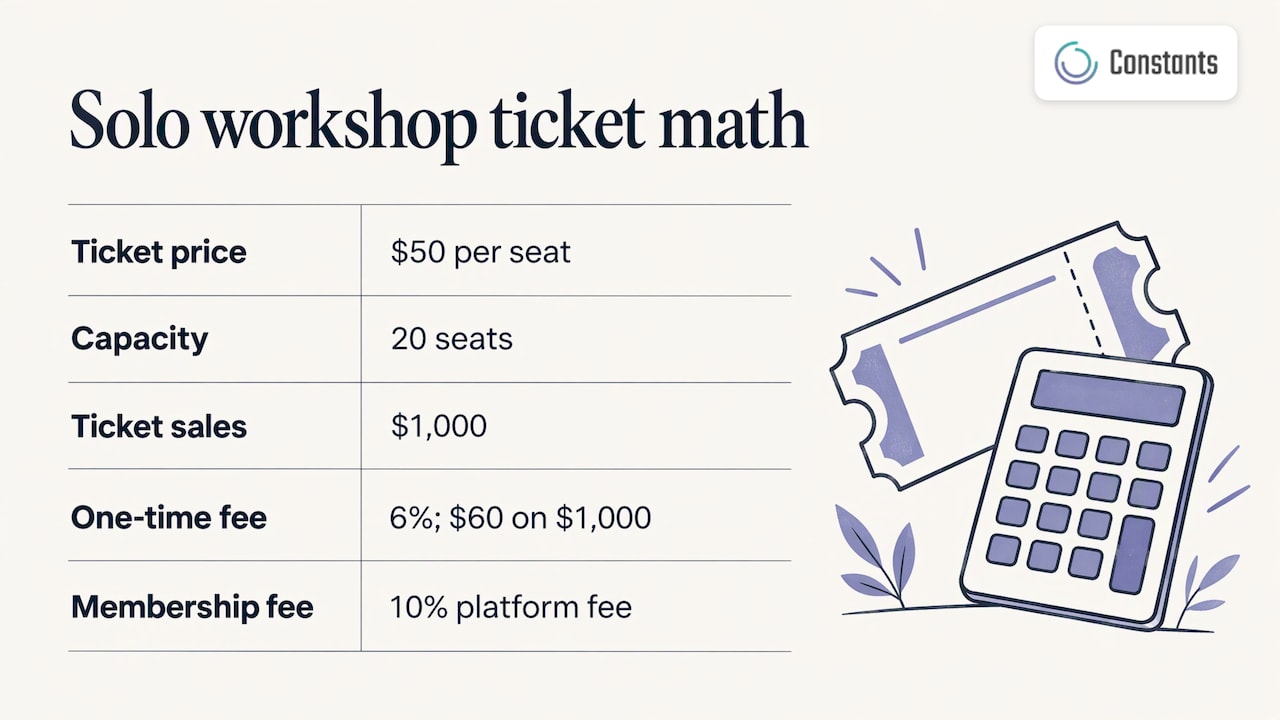
Then work backward from costs. Loopyah's illustrative example uses a $60 ticket, $6 per-ticket costs, $2,700 in fixed costs and $900 in advertising to arrive at a target of 67 tickets. Your numbers will be smaller. Here is a hypothetical for a solo coach: 20 seats at $50 is $1,000 in ticket sales. On Constants, the platform fee on one-time sales, which include event tickets, is 6% on every plan, so $60 on that $1,000, and Stripe's card processing fee is charged separately. Memberships carry a 10% platform fee. Check the exact figures on the pricing page before you set your price so the math is yours, not mine.
If your workshop is part of an ongoing relationship, consider turning it into a series or a membership. A monthly working session for members gives you predictable income and a room of people who already know each other. Our support article on creating a membership shows the setup. Pairing sessions with a space where members keep talking between events also helps; this piece on how to build community online covers the thinking behind that.
How to Promote a Virtual Workshop
Cochrane recommends opening registration at least 6 to 8 weeks before a session, adding a "check the time in your timezone" note, and sending a reminder the day before. For a small paid workshop, a shorter runway works if your audience is warm, but the habits carry over: one clear page, one clear date, a reminder, and a timezone helper.
Your workshop page should answer four questions fast: who is this for, what will I leave with, when is it and how long, and what does it cost. Our guide to the webinar landing page covers what to include, and most of it applies to workshops too. For the wider plan, see online event marketing for creators. Once the page is live, our support article on sharing your Constants page explains how to get the link in front of your audience.
After you launch, look at where registrations come from. The Constants analytics view helps you see what is working, and the support article on reading your analytics explains the numbers. If one post or channel brings most of your sign-ups, do more of that for the next run.
Set Up Your Workshop on Constants
You can run the whole commercial side of a workshop from one page. The free plan can sell from day one, so you can list a first ticketed session without paying a monthly fee. Premium is $29.99 a month if you want more from the platform, and the pricing page lists what each plan includes.

Here is a simple path. Create your page at constants.com/yourname and add your workshop as an event ticket with a capacity and price. Add a 1:1 booking option for people who want a private follow-up. Offer a membership for anyone who wants a recurring session, and open the community so attendees can keep talking after the event. If you are moving from Linktree, Beacons or Stan Store, your page already works as the link in your bio, so you do not need a separate link tool and a separate checkout.
Frequently Asked Questions
Can workshops really be done online?
Yes. The Thomson Foundation has used fully interactive online workshops to teach technically complex subjects, with small groups, cameras on and breakout rooms for exercises. The keys are a small group, frequent activities and clear instructions for each exercise.
How long should a virtual workshop be?
Cochrane recommends 60 to 90 minutes for a virtual workshop of no more than 30 people. Longer sessions need breaks: AASHE advises never going more than 90 minutes without one, and NFPA suggests at least 20 minutes of breaks across a three-hour session.
How many people should I invite?
Cochrane's ceiling is 30 learners. Gate One Consulting finds groups of 12, 16 or 24 work well because they split evenly into breakout rooms, and complex topics do better with fewer people. For a first paid run, 8 to 12 is a comfortable start.
How do I charge for a virtual workshop?
Decide whether you are selling live access, a replay or both, set a seat limit and publish a price. On Constants, you can sell event tickets from your page, with a 6% platform fee on one-time sales on every plan and Stripe card processing charged separately. Memberships carry a 10% platform fee.
Sources
- Cochrane: good practice guidance for webinars and virtual workshops
- Thomson Foundation: the e-workshop
- Miro: tips for creating interactive online workshops
- AASHE: best practices for engaging and dynamic online sessions
- SessionLab: 20 impactful workshop ideas
- SessionLab: how to plan and run a virtual workshop
- Eventbrite: virtual event planning
- Eventbrite: sell online workshop tickets
- Daniel Waas: webinar and virtual event formats
- NFPA: 50 tips for virtual workshops
- Gate One Consulting: how to run workshops and events online
- Loopyah: virtual event marketing strategy and checklist
- Airmeet: plan and run highly interactive workshops
- Baby Love Growth: how to build community online
- The Savage Influence: website accessibility basics