

The best link in bio alternative is the one that matches the job your page does. If it only sends people to a handful of links, almost any tool works. If it needs to sell a digital product, book a call, sell event tickets or run a paid membership, you want a page that does those things natively. That is why we built Constants: one page at constants.com/yourname that combines the link-in-bio landing page with a shop, calendar bookings, tickets, memberships, community, analytics and a notes workspace. The free Starter plan can sell from day one.
This guide covers how to compare tools, where Linktree, Beacons, Stan Store and site builders each fit, and what to check before you move your audience to a new link.
TL;DR
- Pick by the job: routing clicks, selling, booking, memberships or a mini-site are different jobs, and not every tool does all of them.
- Compare two fees separately: the platform's cut of each sale, and the card processing fee. They stack.
- Constants charges 6% on one-time sales and 10% on memberships on every plan, plus Stripe card processing. Starter is free and Premium is $29.99 a month.
- Before you switch, check custom domain support, email and customer export, free-plan limits and branding.
- If your page only needs to list links, a simpler tool can be the better fit.
Table of Contents
- What a Link in Bio Tool Actually Does
- Is Link in Bio Still Worth Using?
- How to Compare Linktree Competitors
- Linktree Alternatives Compared by Use Case
- Free Link in Bio Alternatives
- Which Tool Fits Which Seller?
- What to Check Before Switching From Linktree, Beacons or Stan Store
- Try Constants for Your Link in Bio Page
- FAQ
- Sources
What a Link in Bio Tool Actually Does
A link in bio tool gives you one URL to put where platforms allow only one link: your Instagram, TikTok or YouTube profile. Visitors land on a page that points to everything else you do. That used to be a list of buttons. Now the page often has to do more of the work itself, because every extra click between a visitor and a checkout loses some of them.
The category has split into several jobs. A 2026 comparison from BestCreates judges tools on what you need them to do rather than on a single ranking, and that is the right frame. Ask which of these you need:
- Routing: a tidy list of links to your latest video, newsletter or portfolio.
- Selling: a checkout for digital products such as templates, guides, presets or courses.
- Booking: a calendar where clients pick a time for a 1:1 session.
- Memberships and community: recurring payments for gated content or a group.
- A branded mini-site: your own look, your own domain, more than a stack of buttons.
A tool built for job one can be perfect and cheap. A coach who sells sessions and a membership needs jobs two through four on the same page, and that is where the alternatives start to differ.
Is Link in Bio Still Worth Using?
Yes, for a simple reason: most social platforms still limit clickable links in profiles and posts, so a single destination remains the way you turn followers into subscribers, buyers or clients. The page matters most when it replaces a patchwork. Many freelancers and coaches end up with a link page here, a booking tool there, a payment link somewhere else and a membership bolted on to another service. Each one has its own login, its own fees and its own customer list.
The case for a link in bio alternative is usually consolidation. You keep the one link in your profile, but the page behind it becomes your storefront and calendar, so you stop duct-taping tools together.
How to Compare Linktree Competitors
Use the same six checks for every tool you consider.
Features that match your offers
List what you sell today and what you plan to sell in six months. A page that handles digital products but not bookings will force a second tool the moment you add a coaching call. Constants covers digital products, calendar-based 1:1 bookings, event tickets and recurring memberships, with a community, analytics and notes workspace on the same page.
Platform fees versus processing fees
These are two separate charges. The platform fee is the percentage the tool takes on each sale. Card processing is what the payment provider charges to move the money. BestCreates recommends comparing platform transaction fees separately from payment-processing fees, and that is the only way to see the real cost of a sale.
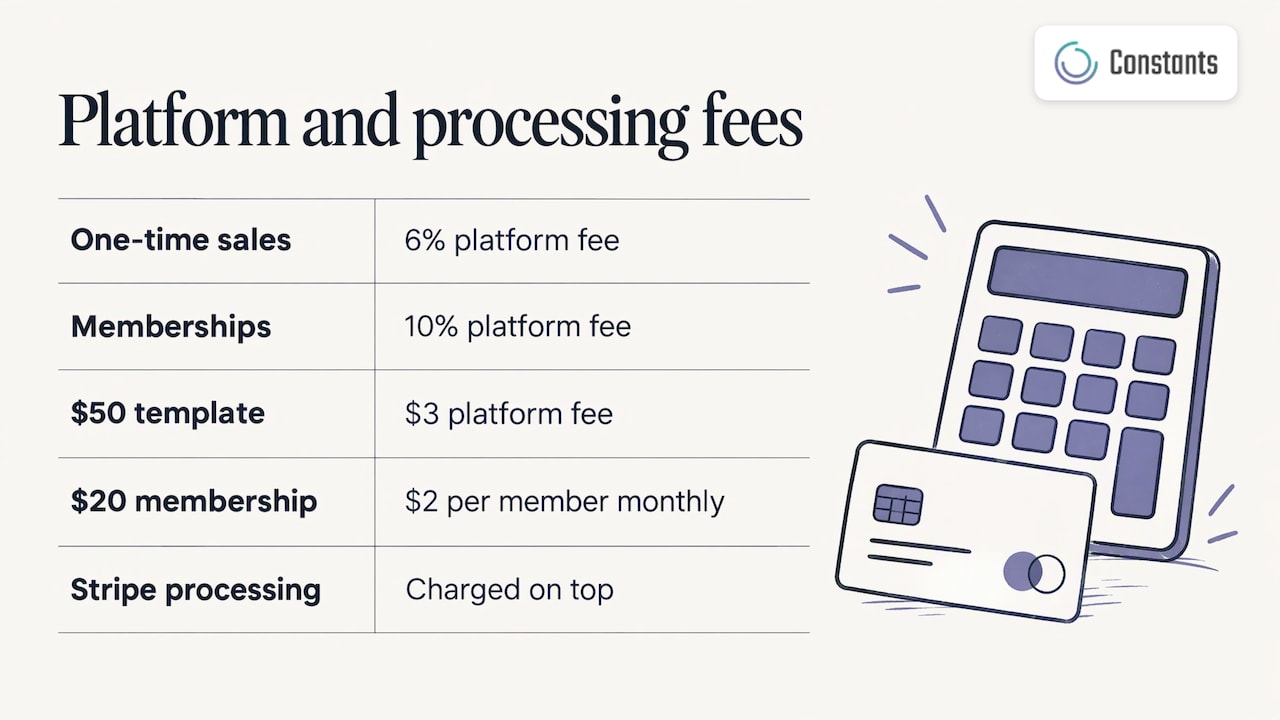
On Constants, the platform fee is the same on every plan: 6% on one-time sales (digital products, bookings and event tickets) and 10% on memberships and subscriptions. Stripe card processing is charged on top of that.
Here is a hypothetical example. You sell a $50 template pack. The Constants platform fee is 6%, which is $3. Stripe's processing charge comes on top, so your payout is the sale price minus both. For a $20 monthly membership, the platform fee is 10%, which is $2 per member per month, again before Stripe. If you want to model processing costs across providers, a payment fee calculator helps you see how quoted fees add up.
When you look at any rival, read the fee on its own pricing page, and check whether the number it shows is the platform fee, the processing fee or both. Some tools charge a monthly subscription to lower or remove their cut, so the right plan depends on your sales volume.
Analytics that answer a real question
Click counts tell you how many people tapped. BestCreates cautions that clicks alone do not show which click led to a sale or an affiliate conversion. A tool that sells on the page itself can connect views to purchases more directly, because the visit and the checkout happen in the same place. Constants includes analytics, and its AI agents are there to help you plan and spot what is working.
Customization and domain
Check whether you can use your own domain, remove the platform's branding and change layout and colors. Many tools reserve these for paid plans.
Data you can take with you
Email addresses and customer records are the asset. Check where collected emails go and whether you can export them. BestCreates lists email and customer export, custom domains and what you can take with you when leaving among the things to compare.
Free plan limits
A free plan is only useful if it does the job you need. Check whether you can sell on it, how many links or pages it allows, and whether the tool's own branding is forced onto your page.
Linktree Alternatives Compared by Use Case
The table below is based on what each type of tool is built for. For current prices and fee terms, use each company's own pricing page, since plans change.
| Tool | Built mainly for | Good fit when | Check before choosing |
|---|---|---|---|
| Constants | One page with links, shop, bookings, tickets, memberships and community | You sell several offer types and want one page and one dashboard | Fees: 6% on one-time sales, 10% on memberships, plus Stripe |
| Linktree | Link page, the category's best-known name | You mainly need a familiar, simple link list | Which plan unlocks selling, custom design and email sync |
| Beacons | Creator storefront and link page | You are a creator building around products and a media kit | Which tier includes memberships, and its fee terms |
| Stan Store | Storefront for creators who sell from social | You want a sales-focused page for products and calls | Plan price and how it handles memberships and community |
| Carrd | Simple one-page sites | You want a cheap, clean page with your own design | Native checkout, which you may need to add through another service |
Constants: the all-in-one page
Constants is the pick when your page has to earn, not just point. You get the landing page at constants.com/yourname, a shop for digital products, calendar-based 1:1 bookings, event tickets and recurring memberships. A community, analytics and a notes workspace sit alongside. The free Starter plan can sell from day one, so you can put your first product live without paying a subscription. Premium is $29.99 a month; the pricing page lists what each plan includes.
For a side-by-side with the best-known name, see our Constants vs Linktree comparison and the longer Linktree alternatives guide.
Linktree
Linktree invented the category and is the easiest name to recognize. If your page is a short list of links and you have no plans to sell on it, it can be the simplest choice, and switching gains you little. If selling or bookings are on your roadmap, compare what its paid tiers unlock against a page where selling is available on the free plan.
Beacons
Beacons positions itself around creator storefronts. If you are a creator weighing it against other tools, look at which tier includes memberships and how its fee is stated on its pricing page. Constants handles memberships at a 10% platform fee on every plan, with a community built in.
Stan Store
Stan Store is a sales-first page for creators who sell from social profiles. If you are moving from it, the questions are plan cost, how memberships work and whether you want a community on the same page. Our Stan Store alternatives guide goes deeper.
Carrd and other site builders
If design control and a low-cost single page matter most and you do not need checkout on the page, a site builder like Carrd is a reasonable fit. When you do need to sell, you will be adding an outside checkout. If you are weighing a page against a full website, our guide on landing page vs website for creators explains when each one is enough.
Free Link in Bio Alternatives
Most tools offer a free plan, and they differ in what they let you do on it. Some give you a link list only and keep selling, custom design or email sync behind a paid tier. Starter on Constants is free and can sell, so a freelancer or coach can list a template, open a booking calendar or start a membership without a monthly bill. The trade is the platform fee on each sale, and you can see exactly what that is before you start: 6% on one-time sales, 10% on memberships.
Two habits keep a free plan honest. First, write down the one thing you need the page to do this month, then confirm the free plan does it. Second, run the numbers at the sales volume you expect. A free plan with a fee on each sale is cheapest while you are earning little. A paid plan can make sense once volume grows, and Premium at $29.99 a month is there when you want the added features.
Which Tool Fits Which Seller?
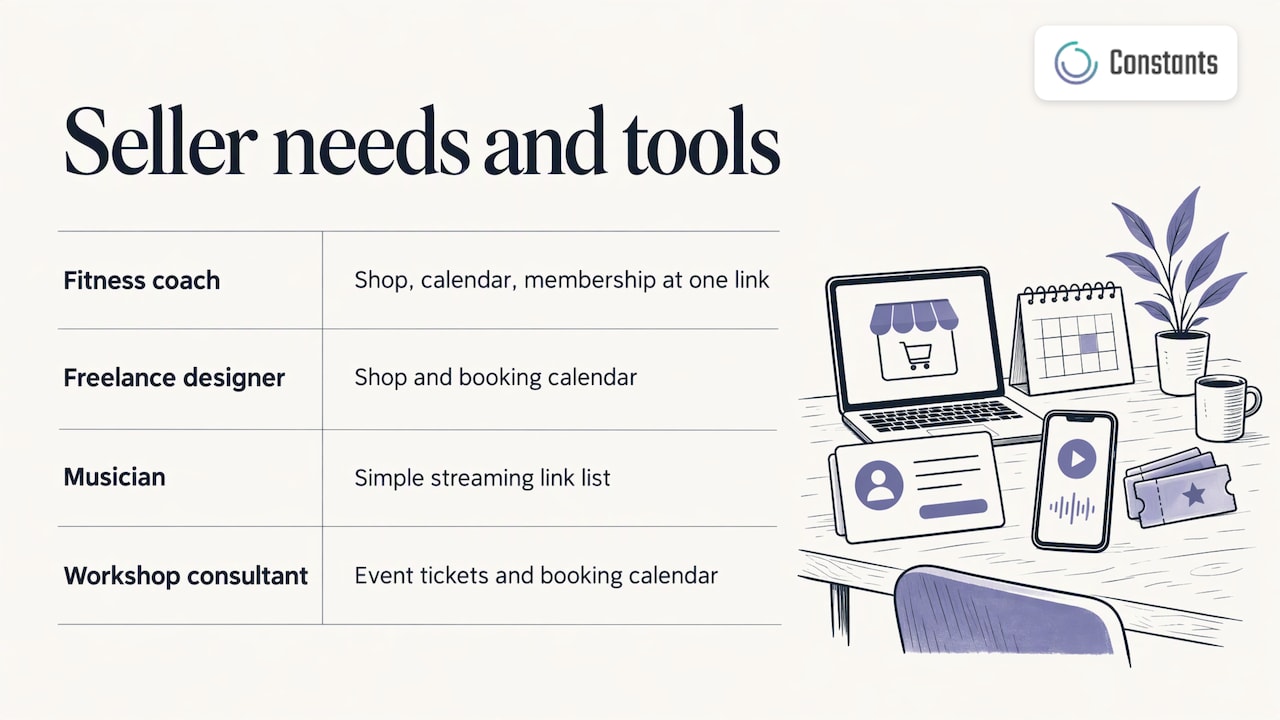
A few hypothetical sellers show how the choice plays out.
A fitness coach sells a $120 program, books $80 intro calls and runs a $25 monthly community. She needs a shop, a calendar and a membership on one page. That is the case Constants is designed for: all three live at one link, with one set of analytics.
A freelance designer sells a $30 template pack and takes project inquiries. A page with a shop and a booking calendar covers both, and Starter lets him start without paying monthly.
A musician only wants to point fans to streaming links. A simple link list does this, and any of the basic tools will do.
A consultant runs paid workshops. Event tickets on the same page as the booking calendar mean she does not need a separate ticketing site. If she later adds recurring revenue, our guide to selling memberships online shows how to set that up and recover failed payments.
What to Check Before Switching From Linktree, Beacons or Stan Store
Switching is easy to do badly. Follow this order.
- Export what you can: email lists, customer records and product files. Confirm you can take your data with you.
- Rebuild the page before you swap the link. Add your products, bookings and bio on the new page and test checkout yourself.
- Check your domain. If you use a custom domain, confirm the new tool supports it and plan the redirect.
- Check country support. Selling features and payouts do not work the same everywhere, so confirm yours.
- Update your profiles last. Change the link in your Instagram, TikTok, YouTube and email signature once the new page is live.
- Keep the old page up for a short while, with a note pointing to the new one, so no one lands on a dead link.
These are the same checks recommended in the BestCreates comparison: domain, export, fees, analytics and what you carry out the door. Take thirty minutes to run through them and you avoid most of the pain.
Try Constants for Your Link in Bio Page
If you want your link in bio to do the selling, Constants gives you one page at constants.com/yourname with a shop for digital products, calendar 1:1 bookings, event tickets, recurring memberships, a community, analytics and a notes workspace. Start on the free Starter plan, which can sell from day one, and move to Premium at $29.99 a month when you want it. Platform fees are 6% on one-time sales and 10% on memberships, with Stripe card processing separate.

See what each plan includes on the Constants pricing page, or browse a live example such as the Retail 101 community.
FAQ
Is there something similar to Linktree but free?
Yes. Several tools have free plans, but they differ in what the free tier allows. Constants Starter is free and can sell digital products, bookings, tickets and memberships from day one. Platform fees apply on each sale, and Stripe processing is separate.
Which is better, Linktree or another link in bio tool?
It depends on the job. For a plain list of links, Linktree is a familiar and simple choice. If you also want to sell products, take bookings and run a membership from the same page, a tool built around selling, like Constants, covers more in one place.
What is the best link in bio tool for Instagram?
The best one is whichever turns your profile visit into your next step with the fewest clicks. For creators and coaches that usually means a page where people can buy, book or join directly. Check that it loads fast on mobile and lets you track which offers get attention.
Do link in bio tools charge fees on sales?
Most tools that let you sell charge a platform fee, a subscription, or both, and the payment processor charges its own fee on top. On Constants, the platform fee is 6% on one-time sales and 10% on memberships on every plan, with Stripe card processing separate.
Sources
- The best link-in-bio tools for creators, judged on what you need (BestCreates)
- Payment fee calculator (SkrillBest)