
The right price for a digital product sits between what it costs you to sell it and what it is worth to the person who buys it. You find the exact spot by checking the fees you pay on each sale, choosing a price that matches the result you deliver, and then testing it against real visitors. If you sell from a page like constants.com/yourname, the fee math is easy to run before you publish, because the platform fee is a fixed 6% on one-time sales and 10% on memberships.
This guide walks through that process for ebooks, templates, guides, courses and the other files and access passes freelancers, coaches and creators sell.
TL;DR
- Start with three inputs: your cost floor, the value the buyer gets, and what comparable products charge. The value sets the ceiling.
- Price on what you keep, not on the sticker. Platform fees and card processing come out of every sale.
- A .99 ending can lift conversion on low-priced products, but it does little for premium offers.
- Test one change at a time and judge it by revenue per visitor, not by conversion alone.
- A price that is too low can hurt you: it attracts careless buyers and can make the product look less valuable.
Table of Contents
- How to price digital products: the three inputs
- Which pricing models work for digital products?
- How to price your ebook
- What fees to include in your digital product price
- Does the .99 pricing trick work?
- How much should I charge for my digital product?
- How to test and adjust your price
- Price the page, not just the product
- Selling at your price from one page
- FAQ
- Sources
How to price digital products: the three inputs
Every price decision rests on the same three inputs. BCG describes them as production cost, which is the floor, customer value, which is the ceiling, and competitor prices, which show the range buyers are used to seeing.
For a digital product, the production cost is mostly your time, plus any software or design help you paid for. The cost of delivering one more copy is close to zero, so the floor is not what limits your price. That is why value matters more here than it does for a physical item.
Value is the harder input. Stripe's pricing guide makes the point with an example: a product that saves a customer $10,000 a year might be a bargain at $2,000. It also suggests asking whether a higher price feels justified to the buyer, and whether a lower price starts to raise doubts. A spreadsheet template that saves a freelancer five hours a month has a clear value. A generic list of tips does not, and it should be priced like it.
Competitor prices come last, and they are a range, not a target. Look at three to five products that solve the same problem for the same buyer. Note what each includes, not only what it costs. If yours has a worked example, a video walkthrough or a template pack the others lack, you can price at the upper end. If it covers less, price lower or add to it. For more on balancing the three inputs, see this guide on balancing cost, value and competitor prices.
Which pricing models work for digital products?
Most digital product prices fall into one of four models. Each answers a different question.
- Cost-plus pricing adds a margin to your costs. It works poorly for digital goods, because your costs are low and tell you nothing about what the product is worth.
- Competitor-based pricing copies the market. It is a fast check, but it makes you a follower, and you inherit a competitor's mistakes.
- Value-based pricing ties the price to the outcome. This is the model to default to. A coach selling a 12-week meal planning system can charge for the result the client wants, not for the number of PDF pages.
- Tiered pricing offers two or three versions of the same product, such as a guide alone, a guide with templates, and a guide with templates plus a live Q&A. Buyers compare tiers against each other, so the middle option often feels like the sensible choice.
Bundles and recurring access are variations on the tiered model. If you have several related products, bundling digital products lets you raise the order value without discounting each item. If your content keeps growing, a membership may suit it better than a one-time sale, and membership pricing models covers how to set that monthly amount.
How to price your ebook
An ebook is the product most first-time sellers start with, so it deserves its own worked example. The same three inputs apply, with a few ebook-specific questions.
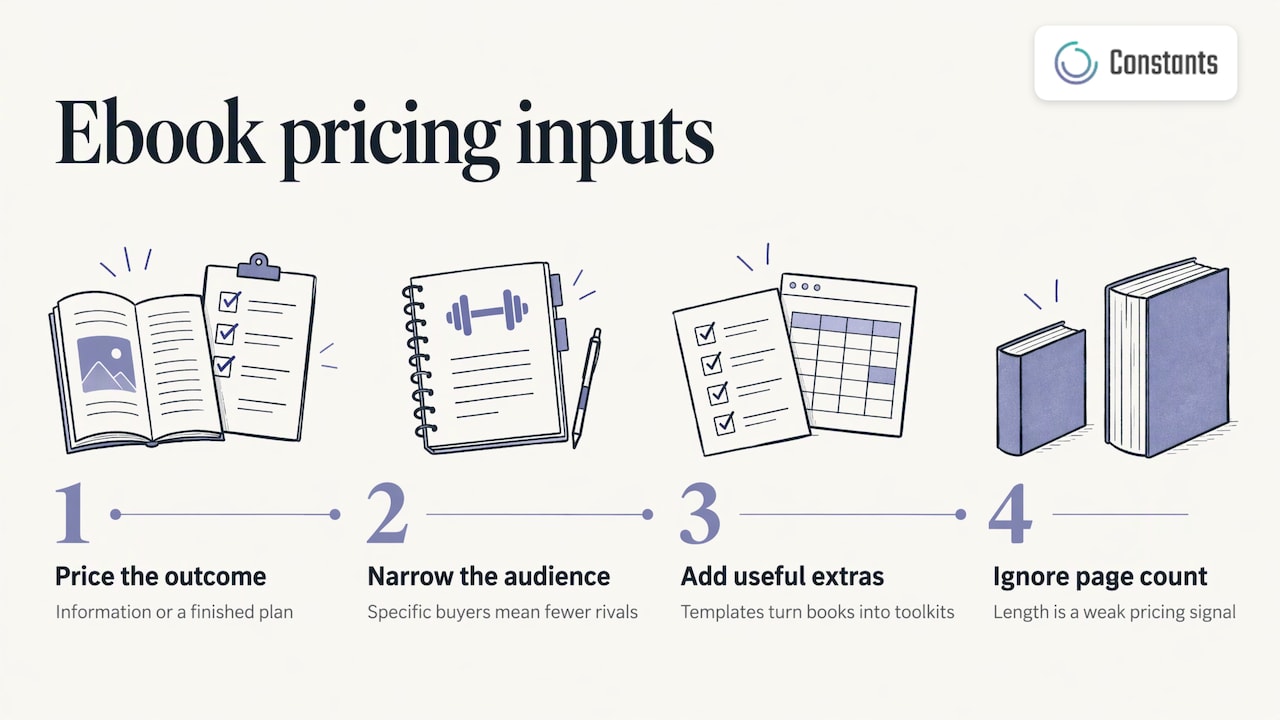
First, what does the reader do after reading it? An ebook that explains a topic is priced as information. An ebook that walks the reader through a process and ends with a finished plan, a filled-in budget or a launched page is priced as a result. Readers pay more for the second kind.
Second, how specific is the audience? A guide for "anyone who wants to be healthier" competes with free articles. A guide for new strength coaches who want to write their first 8-week client program has fewer rivals and a clearer buyer.
Third, what comes with it? A checklist, a spreadsheet or a short video turns a book into a toolkit. These extras cost you a few hours once, and they move the product up a price tier in the buyer's mind.
Fourth, length is a weak signal. A tight 30-page guide that solves one problem can outsell a 150-page book that covers everything. Price the outcome, then tell buyers plainly what is inside.
Here is a hypothetical example. Say you are a freelance designer with a 40-page guide on writing client proposals, plus three editable proposal templates. A reader who wins one extra project because of it has gained far more than the price of the guide. That is the argument for pricing it above a casual impulse buy, even though it is a small file.
What fees to include in your digital product price
The sticker price is not what you keep. Each sale loses a share to the platform and a share to card processing, and those two charges work differently.
On Constants, the platform fee is 6% on one-time sales (digital products, bookings and event tickets) and 10% on memberships, on every plan. Stripe card processing is charged separately. At Stripe's standard US online card rate of 2.9% plus $0.30 per payment, the processing cost has a fixed part that hurts small prices more than large ones.
Here is a hypothetical $29 guide sold as a one-time product:
| Line | Amount |
|---|---|
| Sticker price | $29.00 |
| Platform fee at 6% | $1.74 |
| Stripe at 2.9% + $0.30 | about $1.14 |
| What you keep | about $26.12 |
That is roughly 90% of the sticker price. The same math on a $5 product shows why very low prices are fragile: the fixed $0.30 alone is 6% of the sale, before any percentage fee.
Fees also change how you think about pricing. A peer-reviewed study of a creator platform in China (Zhao, Zervas and Han, 2024) found that when creators qualified for a lower commission, subscription prices rose 8 to 13% and the amount of original content they produced rose 31 to 70%. The lesson for you is practical: a creator who knows their take-home number plans, prices and produces with more confidence. Run the fee math before you pick a price, not after the first sale.
You can see the plan details on the Constants pricing page. The Starter plan is free and can sell from day one, and Premium is $29.99 a month. If you sell only a few items a month, the free plan keeps your fixed costs at zero. As volume grows, you can decide whether Premium's extra tools are worth it to you.
Does the .99 pricing trick work?
Sometimes, and mostly for lower-priced products. In a 2026 study of 89 US online retailers (Kwon and Hartley), charm pricing, meaning prices that end in .99 or 9, improved conversion by 3.2% overall against round numbers. The effect was strongest for value-segment retailers with average orders under $40, at 5.1%, and statistically insignificant for premium retailers with average orders over $100.
For a creator, that translates into a simple rule. A $19 or $29 template pack is a good candidate for a 9 ending. A $400 coaching program or an advanced course is not, because a round number signals confidence. RevenueFlows' September 2026 analysis also cautions that charm pricing can backfire with premium positioning, with high-ticket purchases above roughly $500, and with repeat buyers who remember what they paid last time. It adds that stacking a 9 ending on top of sale badges or strikethrough prices does not add up, because the page already signals a bargain.
The same analysis notes that arbitrary middle numbers like $47 or $23 can convert worse than the round number above and the 9 ending below. If you want to use a charm price, pick $29 or $29.99 and keep it consistent across your page.
How much should I charge for my digital product?
Use this sequence to land on a first number.
- Write down the result. State in one sentence what the buyer can do or have after using the product. If you cannot, the product is not ready to price.
- Put a rough money value on the result. Time saved, a client won, a fee avoided, a skill learned. You are not promising this outcome, you are estimating the scale so you know which price tier you are in.
- Check three to five comparable products. Note price, what is included and how the offer is presented.
- Compute your net per sale after fees, as in the table above.
- Pick a price at the upper-middle of the comparable range if your product is more specific or more complete. Pick the lower-middle if it is narrower.
- Decide your ending. Charm for products at lower price points, round for premium offers.
The common error is going too low. A cheap price feels safe, but it can work against you. In one creator's 30-day log on dev.to, a $3.99 product converted at 2.7% and 27% of buyers were confused about what they had purchased. After the price went to $7.99 and the page was rewritten, conversion reached 4%, revenue per visitor rose from about 11 cents to about 32 cents, and no buyers were confused. It is one creator's experiment, not a rule, but it fits a pattern: a higher price makes people read the page, and the page rewrite did much of the work.
So before you cut a price, check the page. A clearer headline, a visible preview and a plain list of what is included often help more than a discount.
How to test and adjust your price
You will not get the number right on day one, so plan to test. The aim is to learn what buyers do, not what they say.
Follow this routine, adapted from the price-test template at SoloOpsLab:
- Write a hypothesis before you start, for example "raising the price from $19 to $27 will not cut conversion by more than 30%".
- Alternate prices by week, not by day, so each price sees a full cycle of traffic.
- Set a stop rule: a number of sales at each price or a time limit, such as eight weeks.
- Log visitors and sales every day.
- Void any week that was distorted by a launch email, ad spend or a mention from a bigger account.
- Decide on net revenue per visitor: sales multiplied by net per sale, divided by unique visitors.
Revenue per visitor is the number that matters, because conversion alone misleads. SoloOpsLab's break-even math shows that on Stripe net amounts, moving a price from $19 to $27 can tolerate a conversion drop of about 30% and still earn the same revenue. A lower conversion rate at a higher price can be the better result. For help choosing a success metric that reflects revenue as well as conversion, see these conversion rate optimization tips.
Be realistic about sample size. SoloOpsLab estimates you need around 145 sales at the current price to detect a 30% conversion drop with confidence, which at 2% conversion means roughly 7,283 visitors per price. Most small sellers will not reach that. If your traffic is small, make bigger moves (for example $19 against $29, not $19 against $21), and treat results as direction rather than proof. Your own benchmarks are also useful: the conversion rate benchmarks for creators page gives you a sense of what to expect from a small store.
When you change a price, change one thing. If you alter the price, the headline and the cover image on the same day, you will not know which did the work.
Price the page, not just the product
A price is read in context. The same $49 feels different beside a $99 option, beside a free sample, or on a page with no description. Three small changes help most.
Show the price next to what it includes. A short list of the files, templates or sessions inside helps the buyer judge value without scrolling.
Offer a choice when it fits. A basic version and a version with extras gives buyers a reason to compare, and some will pick the higher one. Pricing page examples show how other sellers lay this out.
Make your guarantee or refund terms clear, and keep them true to what you actually offer. Clear terms reduce the hesitation that sits behind most abandoned checkouts.
Selling at your price from one page
Once the price is set, the product needs somewhere to live. Constants gives you one page at constants.com/yourname that holds your link-in-bio landing page and a shop for digital products, with calendar-based 1:1 bookings, event tickets and recurring memberships beside it. That means you can test an ebook price, a session price and a membership price in one place, and the analytics show what is selling.

The Essentials plan is free and can sell from day one, and Premium is $29.99 a month, with the 6% and 10% platform fees applying on every plan and Stripe processing charged separately. You can compare the plans on the pricing page and run the fee math from the table above before you publish. If you are weighing platforms, the guide to the best platforms to sell digital products lays out the options.
FAQ
How much should I charge for my first digital product?
Start from the result the buyer gets, then check comparable products and your net after fees. For a focused guide or template pack, price in the middle of what similar products charge and raise it if the product delivers a clear result. Avoid going so low that the fixed Stripe amount of $0.30 eats a large share of each sale.
Should I end my price in .99?
It can help on lower-priced products, where studies show a modest conversion lift. For premium offers, coaching and high-ticket products, a round number reads as more confident. Pick one style and keep it consistent across your page.
Is it better to start low and raise the price later?
Not necessarily. Very low prices can attract buyers who do not read the page, and raising later can annoy early buyers. A reasonable price with a clear page is the safer start, and you can run a short test at a higher price once you have traffic.
How do fees change the price I should set?
Fees come off every sale, so set the price on your take-home number. On Constants, one-time sales carry a 6% platform fee and memberships 10%, plus Stripe's separate card processing. Work out what you keep on each sale before you publish.
Sources
- Pricing Strategy and Pricing Decisions, BCG
- Pricing a product: A guide to getting it right, Stripe
- The Impact of Platform Commission Design, Zhao, Zervas and Han (2024)
- Digital Product Pricing Strategy: Net Math, Tests, FTC Rules, SoloOpsLab
- Pricing Strategies and Consumer Price Sensitivity, American Impact Review (2026)
- Does Charm Pricing Increase Shopify Conversion Rate?, RevenueFlows
- I Priced My First Digital Product at $3.99, dev.to